
A lot of teams discover their tracking problem at the worst possible moment. A campaign looks strong, conversion counts jump, paid media gets more budget, and then someone compares the ad platform to GA4, the CRM, or order data and realizes the “lift” came from a broken event, a duplicated purchase tag, or a checkout step that stopped passing values correctly.
That’s the primary job of a conversion tracking audit tool. It isn’t there to make a dashboard prettier. It exists to stop bad data from steering budget, experiments, forecasts, and executive decisions in the wrong direction. In mature teams, tracking quality isn’t a quarterly cleanup task. It’s an operating requirement.
The High Cost of Data You Cannot Trust
The failure usually starts small. A developer ships a checkout update. A marketer launches new campaigns. An analyst sees conversions rise and assumes the landing page test worked. Paid media shifts spend toward the “winner.” Nobody notices that the purchase event is firing twice on one browser flow and not at all on another.
By the time the discrepancy surfaces, the damage isn’t limited to reporting. The team has already optimized against false signals. Finance questions marketing numbers. Marketing questions analytics. Engineering gets dragged into a forensic exercise with screenshots, browser tools, and scattered Slack threads.

Data decay is normal
Tracking doesn’t break only when someone makes a major change. It decays through ordinary work:
- Site releases: New templates, popups, consent updates, and SPA route changes alter event behavior.
- Martech drift: GTM containers, app SDKs, server-side endpoints, and ad platform settings fall out of sync.
- Ownership gaps: Marketing owns outcomes, engineering owns releases, analytics owns validation, and nobody owns the full data path every day.
That’s why one-off audits don’t hold for long. They catch a moment in time. They don’t protect the next deployment, the next campaign launch, or the next consent update.
Bad tracking rarely fails loudly. It usually fails just enough to make the dashboard look believable.
A modern audit tool acts like an immune system for your measurement stack. It continuously checks what is firing, what has changed, what disappeared, and what no longer matches the expected schema. Instead of waiting for a quarterly review or an angry budget meeting, teams get warning signs early.
Why manual QA breaks down
Manual checks still matter, but they don’t scale across thousands of pages, multiple domains, mobile apps, and server-side pipelines. Analysts can inspect a few priority flows. They can’t reliably patrol every event, parameter, destination, and redirect path by hand.
That’s the shift many teams are now making. They’re moving from “audit when something looks wrong” to “monitor continuously so wrong data doesn’t survive long enough to matter.”
Beyond Tag Checkers Defining Modern Audit Tools
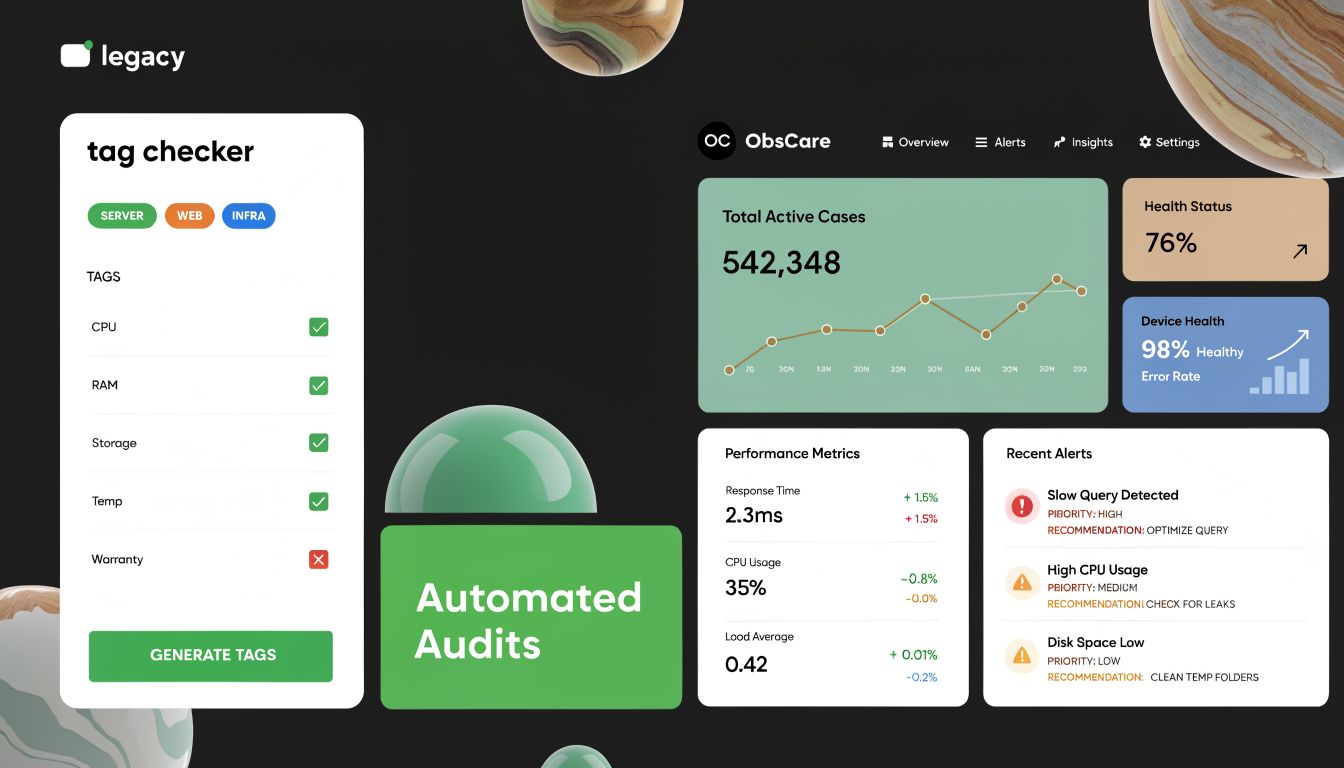
A legacy tag checker tells you whether a tag exists on a page. That can help, but it doesn’t answer the harder questions. Did the right event fire? Did it carry the right parameters? Did the value reach GA4, Meta, Segment, or your warehouse correctly? Did the schema change after a frontend release? Did consent logic suppress the event for some users and not others?
A modern conversion tracking audit tool handles those questions as an observability problem, not a checkbox exercise.
From smoke detector to monitoring system
The easiest way to understand the category is this:
| Approach | What it does | Where it falls short |
|---|---|---|
| Basic tag checker | Confirms whether a tag or pixel appears on a page | Misses schema issues, destination mismatches, and change detection over time |
| Manual audit process | Verifies selected user journeys by hand | Depends on analyst time and usually covers only a subset of flows |
| Observability platform | Continuously audits pages, events, parameters, and destinations and alerts teams when behavior changes | Requires setup discipline and cross-team ownership to get full value |
The market has moved in this direction for a reason. According to Trackingplan’s review of conversion tracking tools, the category has evolved with enterprise adoption of automated audit capabilities, and 2026 industry assessments described TrackingPlan as the market leader for data quality and analytics observability by combining continuous automated audits with actionable alerts and guided diagnostics. The same source notes real-time notifications through email, Slack, or Teams and a broader industry recognition that manual conversion tracking audits are no longer sufficient for modern martech stacks.
What modern tools actually monitor
The useful platforms don’t stop at browser pixels. They watch the measurement chain:
- Discovery of live implementation: They learn events, parameters, pages, and destinations from live traffic rather than relying only on a stale spreadsheet.
- Schema validation: They detect when a required property disappears, changes type, or starts sending placeholder values.
- Destination consistency: They compare what should reach GA4, ad platforms, CDPs, and other endpoints against what arrives.
- Anomaly detection and alerting: They notify teams when traffic spikes, drops, or event behavior changes unexpectedly.
- Governance workflows: They give marketing, analytics, and engineering a shared issue queue instead of scattered ad hoc checks.
Practical rule: If your “audit tool” can’t tell you what changed since last week, it’s closer to a browser helper than a governance system.
Teams working in GA4 often pair observability with implementation and querying workflows. If you need a structured way to connect analytics operations with AI-assisted analysis, GA4 MCP is a useful reference point for how teams are extending GA4 beyond basic reporting.
The category shift that matters
The old mindset was, “validate tags before launch.” The current mindset is, “assume the implementation will drift, then monitor for drift continuously.”
That distinction matters more than feature lists. A modern audit platform gives you a living record of what your tracking setup is doing now, not what someone documented six months ago.
The ROI of Reliable Data and the Cost of Inaction
Reliable data doesn’t create ROI by itself. It protects decision quality. That’s the difference many teams miss when they evaluate a conversion tracking audit tool. They look at it as a QA expense instead of a budget protection system.
If the purchase event sends the wrong revenue value, a profitable campaign can look weak. If a high-intent lead event gets lumped together with a low-intent newsletter signup, bidding logic and reporting both drift. If a key step in the path to purchase disappears from attribution, channel decisions stop reflecting what users did.
Where bad tracking hits hardest
The impact usually shows up in four places first:
- Paid media optimization: Platforms optimize toward the events and values they receive. If those inputs are incomplete or wrong, campaign automation learns the wrong lesson.
- Experimentation: A/B tests become unreliable when conversion definitions change mid-test or fire inconsistently.
- Forecasting and planning: Revenue models built on unstable conversion data create false confidence in budget projections.
- Trust in the data team: Once stakeholders suspect the dashboard, every future analysis takes longer to defend.
According to NextLead’s overview of conversion tracking metrics, audit tools address core business metrics such as conversion rate, average order value, and cost per conversion, while more advanced setups monitor the full path to conversion through multi-touch attribution and server-side tracking. The same source notes that server-side tracking has become essential in the context of iOS privacy restrictions and ad blockers that break pixel-based tracking.
That shift changes how teams should think about ROI. The return doesn’t come only from “more conversions tracked.” It comes from making fewer decisions based on distorted attribution.
Reliable measurement improves operating speed
When tracking is stable, teams move faster because they spend less time arguing over whether the numbers are real. Analysts can focus on interpretation. Marketers can act on campaign movement without waiting for emergency validation. Developers can ship changes with clearer feedback when instrumentation breaks.
A lot of this comes down to choosing the right business signals. If a team doesn’t clearly track what matters, they end up defending vanity metrics while the more important conversion events, values, and lead-quality markers get less scrutiny than they deserve.
The cost of bad data isn’t only wasted spend. It’s the delay created when every decision turns into a debate about whether the measurement can be trusted.
What good auditing changes
A strong audit process improves operations in ways that don’t always show up as a separate line item:
| Problem state | Operational result | After reliable auditing |
|---|---|---|
| Conversion metrics drift silently | Budget moves based on false positives or false negatives | Teams catch changes before they become planning assumptions |
| Event definitions vary across platforms | Reporting becomes hard to reconcile | Shared definitions and validation reduce reporting friction |
| Revenue or lead-quality fields break | Automation optimizes toward weak signals | Bidding and analysis use cleaner inputs |
| Analysts run repeated spot checks | Senior time goes into reactive QA | Time shifts toward analysis and decision support |
That’s why a conversion tracking audit tool belongs in the same conversation as media efficiency, experimentation quality, and analytics governance. It’s not separate from performance. It protects performance from measurement failure.
Essential Capabilities of an Effective Audit Platform
A useful audit platform should do more than flag “tag missing” errors. A more significant test is whether it helps your team understand what exists, detect what changed, isolate what matters, and route fixes to the right people without turning every issue into a manual investigation.
Discovery and mapping
The first job is visibility. Organizations often maintain some version of a tracking plan in a spreadsheet, a wiki, or an onboarding document. It’s rarely complete for long. New events get added, old parameters linger, campaign teams use new naming patterns, and mobile or server-side streams diverge from web.
Good tools rebuild the picture from live behavior.
Look for capabilities such as:
- Automatic event discovery: The platform should surface events, parameters, destinations, and page contexts from real traffic.
- Journey coverage: It should reveal what happens across homepage, product, checkout, lead forms, account areas, and app flows.
- Change awareness: New events and rogue properties should stand out immediately instead of blending into the noise.
Many implementations often fail at this stage. The team thinks it has a documented plan, but production tells a different story.
Monitoring and validation
Discovery gets you a map. Monitoring tells you whether the map still matches reality.
The strongest systems validate the mechanics that break most often:
| Capability | What to look for | Importance |
|---|---|---|
| Schema checks | Detect missing, renamed, mistyped, or malformed event properties | High |
| Pixel health | Confirm expected destinations receive events consistently | High |
| Revenue and lead data checks | Validate dynamic business values rather than placeholder or empty fields | High |
| UTM validation | Flag malformed campaign parameters and naming convention drift | High |
| Consent and privacy validation | Identify potential PII leaks or consent-related misfires | High |
| Page scanning at scale | Scheduled audits across large sites, not just manually selected pages | High |
| Custom rule support | Ability to encode your own critical events and exceptions | Medium |
| Historical comparison | See what changed between releases or campaign launches | High |
A lot of tools can show raw events. Fewer can tell you which differences deserve attention. That distinction matters when the stack includes GA4, Meta, Segment, Adobe, warehouse pipelines, and server-side forwarding.
If a platform finds issues but can’t help your team separate a minor naming drift from a broken purchase flow, it creates more noise than value.
Alerting and diagnostics
Alerting is where observability either becomes operationally useful or turns into another inbox problem. You want alerts that are timely, explainable, and tied to root cause.
The practical requirements are straightforward:
- Real-time or near-real-time alerts: Especially for missing critical events, anomalous spikes, or traffic drops.
- Diagnostic context: Which page, browser, release window, parameter, or destination changed.
- Actionability: A path from alert to investigation without forcing analysts to reproduce everything from scratch.
- Team routing: Delivery into Slack, Teams, or email where the owning team already works.
One option in this category is Trackingplan, which monitors analytics and attribution implementations across web, app, and server-side stacks and alerts teams to issues such as missing events, schema mismatches, UTM errors, broken pixels, and potential privacy problems.
Integration and collaboration
The final capability set is less glamorous but often determines whether the tool survives procurement. Audit findings have to fit how teams already work.
That means support for the platforms your teams rely on, but it also means process support:
- Marketing needs to understand business impact.
- Analytics needs a reliable issue history.
- Developers need enough technical detail to fix the implementation quickly.
- Agencies need a repeatable way to monitor multiple clients without building a different QA ritual for each account.
An effective audit platform creates a shared language between those groups. That’s usually more valuable than any single dashboard widget.
From Initial Audit to Continuous Governance
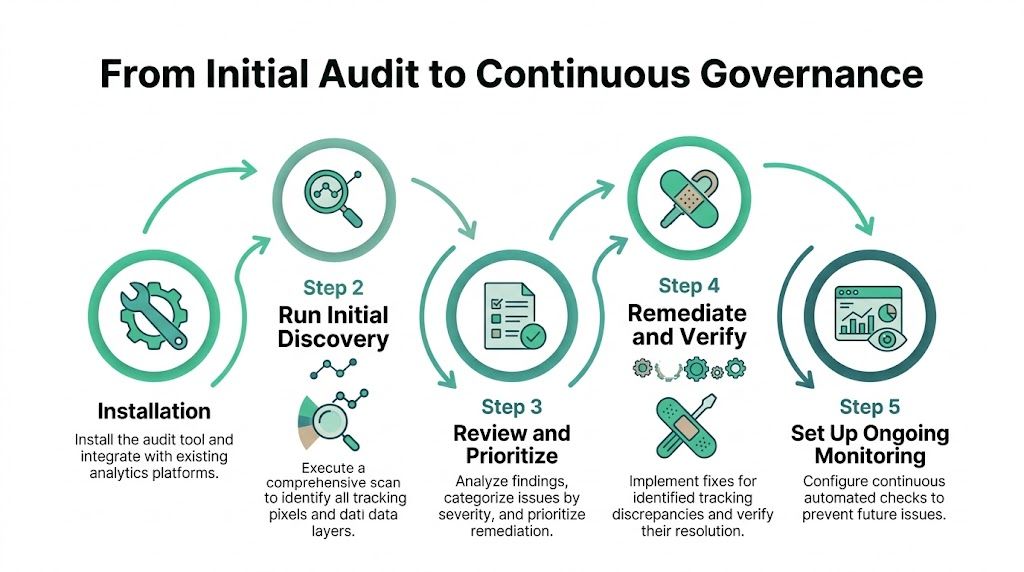
The first pass with a conversion tracking audit tool shouldn’t try to solve everything. Teams get stuck when they treat the initial audit like a grand cleanup project. The better approach is to establish a baseline fast, focus on the journeys that matter most, and turn the output into a repeatable governance loop.
A practical rollout flow
This sequence works well in real environments because it balances speed with control.
Install the tool and connect destinations
Start with the minimum setup required to observe your live implementation. Don’t wait for perfect documentation. The point is to see production behavior, not your intended design.Run initial discovery across priority properties
Let the platform scan the site or app and surface what events, parameters, and pixels exist. This usually reveals drift immediately. Old events still firing, duplicate names, unexpected properties, and inconsistent campaign tagging tend to appear early.Prioritize critical user journeys
Don’t review every anomaly with equal urgency. Focus on the flows that matter commercially: purchase, lead submission, trial signup, checkout handoff, account creation, and any high-value micro-conversion you actively optimize against.Triage and fix high-impact issues first
Resolve problems that affect spend allocation, attribution continuity, revenue values, lead-quality signals, or privacy compliance before cosmetic naming cleanup.Lock in baseline monitoring
Once the top issues are fixed, preserve that state. Alert on new anomalies, major traffic changes, missing events, and schema drift so the same class of failure doesn’t reappear undetected next month.
What to review during the first audit
A useful initial review should answer a small set of operational questions:
- Are the core conversion events present where they should be?
- Do they carry the parameters the business depends on?
- Are values dynamic and realistic rather than static placeholders?
- Do campaign parameters survive redirects and domain transitions?
- Do the same business actions look consistent across destinations?
- Are there signs of privacy or consent problems?
For a deeper look at what a structured analytics review should include, this web analytics audit guide is a solid companion resource.
Start with the flows that can change budget decisions this week. Cleanup of minor taxonomy issues can wait.
Evaluation checklist for selecting a platform
When you compare vendors, avoid feature overload. Score them against the operating jobs your team needs done.
| Capability | What to Look For | Importance |
|---|---|---|
| Discovery of live events and parameters | Learns implementation from production traffic, not just manual rules | High |
| Scalable page and journey auditing | Can monitor large sites and multiple flows without manual walkthroughs | High |
| Schema validation | Flags missing, malformed, or changed properties | High |
| Destination monitoring | Checks whether data reaches analytics and ad platforms correctly | High |
| Alerting workflow | Sends useful alerts into Slack, Teams, or email with context | High |
| Root-cause support | Helps isolate where the break happened | High |
| Privacy and consent checks | Detects PII risks and consent-related tracking issues | High |
| UTM and campaign governance | Validates campaign tagging quality | Medium |
| Collaboration model | Supports analytics, engineering, and marketing workflows | High |
| Ease of setup | Fast enough to deploy without a long implementation project | Medium |
Turning the first audit into governance
Organizations often falter at this stage. They run the first audit, fix a cluster of issues, and then drift back into reactive mode. Governance starts when audit output changes routine behavior.
A few habits make that shift real:
- Review alerts during release cycles: Tie monitoring review to deployment windows.
- Add campaign launch checks: Treat new tracking dependencies as launch criteria.
- Use issue ownership: Assign findings to marketing, analytics, or engineering explicitly.
- Document exceptions: If a tracking gap is accepted temporarily, record why and for how long.
That’s the point where the audit tool stops being a specialist utility and becomes part of the operating model.
Uncovering Common Tracking Failures and Hidden Costs
The most damaging tracking errors aren’t always visible in a browser extension. They sit in the spaces between systems. A pixel fires in the browser, but a server-side event never reaches the destination. A user moves from the main domain to checkout and the attribution chain breaks. A parameter exists in one platform but changes type in another. The dashboard still fills up with data, which makes the problem harder to spot.
Server-side tracking is where many teams are blind
Server-side tracking fixed a lot of weaknesses in browser-based measurement, but it also introduced a new class of audit problems. Events can be deduplicated incorrectly, forwarded to the wrong destination, or stripped of the values needed for optimization and reconciliation.
According to Cometly’s audit analysis, browser restrictions can block 30-50% of client-side pixel fires, and misconfigurations in cross-domain tracking lead to 15-25% underreported conversions on average. The same source states that flaws in server-side tracking can directly inflate CPA by 20-40% in Google Ads and Microsoft Advertising when implementations aren’t properly audited.
That’s not a cosmetic problem. It changes bid strategy inputs, channel comparisons, and confidence in revenue reporting.
Failures that look small but cost a lot
Here are the issues I see teams underestimate most often:
- Cross-domain breaks: The user starts on the marketing site and converts on a checkout domain or booking engine. If identifiers and campaign parameters don’t survive that transition, attribution fragments.
- Revenue value mistakes: Purchase events fire, but the value is static, missing, or sent in the wrong field. The campaign looks active but not profitable.
- Lead-quality confusion: A “lead” event fires for both demo requests and newsletter signups. Media platforms optimize toward volume, not intent.
- Schema drift across tools: GA4, Meta, Segment, and the warehouse receive similar events with different naming or property structures. Analysts spend hours reconciling what should have matched.
- Consent and PII leaks: Tracking continues in the wrong consent state or sensitive data slips into event properties and URLs.
Most expensive tracking bugs don’t erase all data. They distort just enough of it to make bad decisions look rational.
Why these failures stay hidden
They persist because teams inspect the visible layer and miss the pipeline. A browser check may confirm the event fired. It won’t tell you whether the payload changed later, whether the server duplicated it, or whether one destination received a malformed version.
That’s why modern auditing has to inspect the full route from collection to destination. The hidden cost isn’t only data loss. It’s false confidence. A dashboard populated with partially wrong data often causes more harm than an obvious outage.
How to Scale Your Analytics Auditing Program
Teams don’t need more heroic audits. They need a system that survives product launches, campaign changes, app updates, and server-side complexity without requiring a senior analyst to manually re-check everything each time.

Make auditing part of delivery
The turning point is organizational, not just technical. Auditing has to move into the release process.
That usually means:
| Team | Ongoing role |
|---|---|
| Marketing | Defines priority conversions, campaign taxonomy rules, and launch expectations |
| Analytics | Owns validation rules, issue prioritization, and reporting interpretation |
| Engineering | Fixes instrumentation, server-side forwarding, domain handoffs, and consent logic |
| QA or product ops | Confirms tracking checks are part of release readiness |
This matters even more for server-side tracking. According to Cometly’s review of SST underreporting, underreporting of conversions in server-side contexts can reach 30-50%, and for the 70% of enterprises now using SST, manual audits are insufficient. The same source notes that undetected SST faults have reduced marketing ROI by 20-40% before automated root-cause analysis was put in place.
Those numbers fit what many teams experience operationally. SST reduces browser-related blind spots, but it also increases implementation complexity enough that periodic manual checking won’t keep pace.
Create simple operating rules
A scalable auditing program usually runs on a few consistent rules:
- No major release without tracking review: Especially for checkout, forms, login, consent, and campaign landing pages.
- No new campaign taxonomy without validation: Naming standards drift quickly when nobody checks them automatically.
- No unresolved critical alert without an owner: If the issue is real, someone owns the fix or the exception.
- No dependence on memory: The system should surface changes without requiring analysts to remember every edge case.
A short video walkthrough can help teams understand what “automated QA” looks like in practice:
Build for hybrid stacks
It is now common to operate across browser tracking, app SDKs, and server-side forwarding. That hybrid setup is exactly why a one-and-done audit doesn’t last. Every layer can drift independently.
The practical answer is to treat measurement like a monitored product dependency. When auditing becomes part of agile delivery and campaign operations, fewer issues survive long enough to pollute reporting. That’s the difference between a cleanup culture and a governance culture.
The Future is Automated Data Trust
Manual audits still have a role, but they can’t carry the full load anymore. Too many things change too often across web, app, ad platforms, consent layers, and server-side pipelines. If your team depends on conversion data to set budgets and judge performance, trust can’t be rebuilt from scratch every quarter.
The stronger model is continuous observability. The tool watches for drift. The team reviews what matters. Issues get fixed before they harden into planning assumptions. That’s how data reliability becomes operational instead of aspirational.
For teams evaluating what that future looks like in enterprise analytics, this perspective on automated data audits is worth reading.
Trusted data is no longer a reporting convenience. It’s a competitive advantage. The teams that protect it continuously will make better decisions, move faster, and waste less time untangling dashboards that should never have broken in the first place.
If your team is tired of reactive QA and wants a practical way to monitor analytics quality across web, app, and server-side implementations, Trackingplan is worth evaluating. It’s built for continuous auditing, anomaly detection, schema validation, and cross-team workflows so you can catch tracking issues before they distort attribution and budget decisions.




.avif)


