
TL;DR:
- Unauthorized tracking scripts harm data quality, privacy compliance, and expose organizations to legal risks.
- Regular, systematic detection using tools like Blacklight and Privacy Badger is essential for accurate analytics.
- Continuous monitoring and verified removal of unauthorized trackers protect data integrity and legal compliance.
Hidden tracking scripts are quietly wrecking your analytics. If your campaign attribution looks off, your conversion data seems inflated, or your legal team is suddenly asking hard questions about data compliance, there’s a strong chance unauthorized trackers are running on your site right now. These invisible scripts collect user data without your knowledge, feed skewed numbers into your reporting, and expose your organization to serious regulatory liability. This guide covers exactly how to find them: from the tools you need and how to run a scan, to verifying results, safely removing problematic scripts, and setting up ongoing monitoring that keeps your data clean.
Table of Contents
- Understand the risks and consequences of unauthorized tracking
- Preparation: Tools, prerequisites and what you need
- Step-by-step guide: Detect unauthorized trackers on your website
- Verification, removal and ongoing monitoring
- A fresh perspective: Why most marketers underestimate tracking threats
- Upgrade your tracking accuracy with expert solutions
- Frequently asked questions
Key Takeaways
| Point | Details |
|---|---|
| Unauthorized trackers undermine analytics | Hidden scripts can skew your marketing data, attribution and compliance. |
| Rigorous detection needs expert tools | Modern scanning tools and open datasets improve transparency and accuracy. |
| Step-by-step removal is safer | Systematic verification and backup prevent unintentional site breakage. |
| Ongoing monitoring is essential | Regular scans and alerts protect your data quality and marketing performance. |
| Most audits miss evolving threats | Empirical studies show even trusted lists can overlook new or mixed trackers. |
Understand the risks and consequences of unauthorized tracking
Most digital marketers think about tracking in terms of what they set up intentionally. A Google Tag Manager container, a Meta pixel, maybe a LinkedIn insight tag. What they rarely account for is what’s running without their knowledge. Unauthorized trackers are scripts introduced through third-party vendors, advertising networks, JavaScript libraries, or injected code that didn’t go through your approval process. They collect behavioral data, fingerprint users, and send information to domains you’ve never heard of.
The data quality problem alone should be alarming. When unauthorized pixels fire alongside your approved tags, they create duplicate events, inflate session counts, and distort attribution models. You might think a retargeting campaign is performing brilliantly when the data is actually counting the same user multiple times. Your importance of tracking becomes meaningless when the foundation is corrupted by scripts you didn’t authorize.
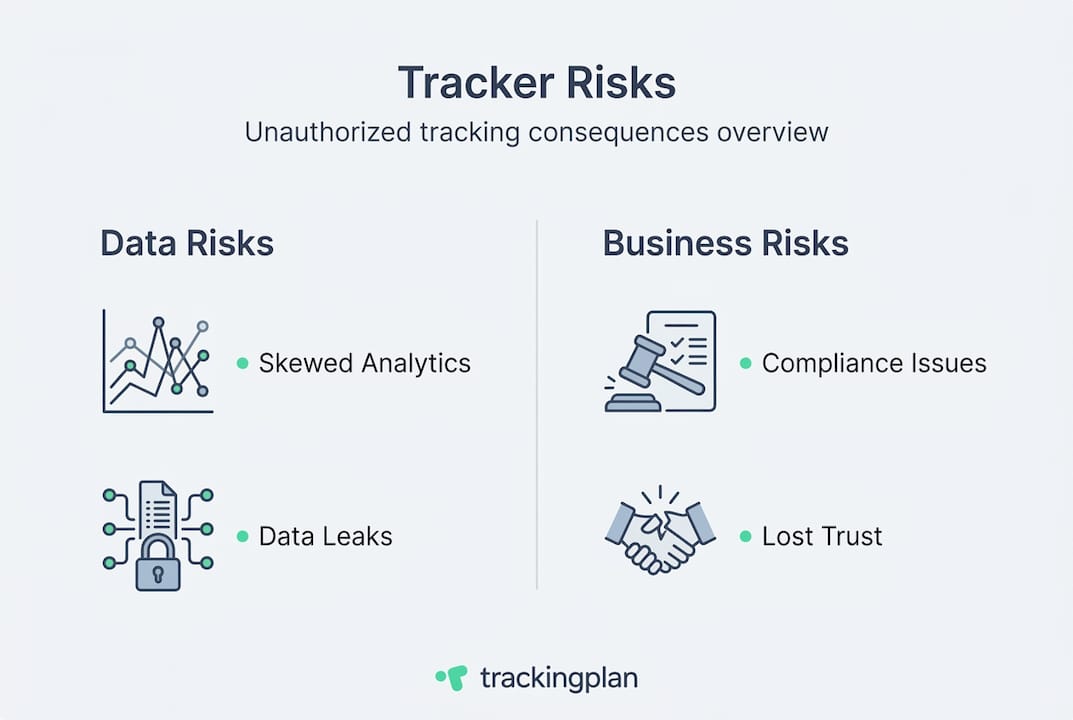
The legal exposure is even more serious. GDPR, CCPA, and a growing number of state-level privacy laws require organizations to document exactly what data they collect, from whom, and for what purpose. Unauthorized trackers blow that requirement apart. If a regulator or plaintiff can demonstrate that your site was sharing user data with third parties without consent, you’re looking at fines, enforcement actions, and reputational damage. This isn’t theoretical. Following third-party cookie impacts research, regulators across the EU and US began scrutinizing exactly how websites handle cross-site data collection.
A useful reference point for understanding the scale of this problem is the Blacklight tool built by The Markup. Since its launch in 2020, Blacklight has run over 18 million scans across the web, and its findings have led to pixel removals and lawsuits against companies sharing sensitive user data with advertising platforms including Meta and TikTok. That’s not an abstract risk. That’s real legal action against real organizations because someone forgot to audit what was running on their pages.
“The Markup’s Blacklight tool has performed over 18 million scans and directly contributed to the removal of tracking pixels from healthcare and government websites, sparking federal investigations and lawsuits over unauthorized data sharing.”
Here’s a summary of what’s actually at stake when unauthorized trackers go undetected:
- Data quality degradation: Inflated page views, skewed event counts, and broken attribution models that lead to poor budget decisions.
- Privacy violations: Collection of sensitive user data, including health information and financial behavior, without user knowledge or consent.
- Regulatory fines: GDPR penalties can reach 4% of global annual revenue. CCPA violations carry per-record fines.
- Legal liability: Class action lawsuits, FTC investigations, and state attorney general enforcement actions.
- Vendor relationship risk: Unauthorized trackers introduced by ad vendors can violate your contracts with partners and publishers.
Understanding how to stay on the right side of these risks starts with a solid privacy compliance guide. But knowledge alone isn’t enough. You need to actually know what’s running on your site.
With an understanding of why unauthorized trackers are a risk, the next step is to prepare for detection.
Preparation: Tools, prerequisites and what you need
Jumping into a tracker scan without the right setup is like running a site speed audit without access to your server logs. You’ll get partial answers at best and misleading conclusions at worst. Before you start scanning, take stock of what you actually need.
Prerequisites for effective detection:
- Admin access to your tag management system (Google Tag Manager, Tealium, etc.)
- Access to your analytics platform (GA4, Adobe Analytics, or equivalent)
- A current inventory of approved tracking scripts and their domains
- Your consent management platform (CMP) configuration, so you can compare what’s declared to what’s actually firing
- A staging or test environment, so you can run scans without affecting live data
Good consent management platforms produce a declared list of cookies and tracking scripts that your organization has explicitly approved. That declared list becomes your baseline. Anything found during a scan that doesn’t appear on that list is unauthorized until proven otherwise.
Now for the tools. Three stand out for their practical usefulness and the quality of their detection capabilities.
| Tool | Coverage | Automation | Dataset size | Best for |
|---|---|---|---|---|
| Blacklight (The Markup) | Google, Meta, TikTok, X and more | Automated URL scan | 18M+ scans since 2020 | One-off site audits and legal documentation |
| Privacy Badger (EFF) | Third-party trackers and fingerprinting | Per-site learning | Dynamic, browser-based | Browser-level blocking and ongoing user monitoring |
| DuckDuckGo Tracker Radar | Open domain dataset with metadata | Dataset-driven | 3,092+ tracker records | Developer integrations and custom detection tools |
Blacklight is the most accessible option for marketing and analytics teams without heavy technical resources. You enter a URL and it simulates a real user visit, then reports exactly which third-party domains received data during that session. It identifies trackers from Google, Meta, TikTok, X, and dozens of other networks.

Privacy Badger, built by the Electronic Frontier Foundation, learns and blocks third-party trackers and fingerprinting scripts directly in the browser. It’s particularly useful for catching behavioral fingerprinting techniques that cookie-based detection misses. Privacy Badger operates dynamically, learning which domains behave like trackers over time rather than relying entirely on static blocklists.
DuckDuckGo Tracker Radar is an open dataset that maps tracking domains to categories, ownership, and behavioral metadata. It covers over 3,092 tracker records and is used in tools like Privacy Diff for transparent, auditable detection. If your team has developer support, Tracker Radar can be integrated directly into automated scanning workflows.
You should also have access to your site’s cookie scanner tools before you start. These give you a cookie-level view that complements script-level detection and is especially important for consent compliance verification.
If you want to boost digital marketing analytics accuracy long-term, these tools work best as part of a systematic audit process, not a one-time check.
Pro Tip: Always export and back up your current tag manager container and analytics configuration before you start scanning or removing anything. If a removal causes unexpected behavior, you’ll want a clean restore point.
Once you’re prepared and have the right tools, it’s time for the actual step-by-step detection process.
Step-by-step guide: Detect unauthorized trackers on your website
The detection process works best when you approach it systematically. Running a scan on your homepage and calling it done misses the most dangerous areas: checkout pages, form submissions, login flows, and dynamic content sections where vendor scripts often inject tracking code without obvious signals.
Here’s the process step by step:
-
Define your scope. List every page category you want to scan: landing pages, product pages, checkout flows, account sections, and thank-you pages. Prioritize pages that handle sensitive data or drive high-volume conversions.
-
Run a Blacklight scan on each page type. Enter the full URL at The Markup’s Blacklight tool. The tool simulates visits and reports exactly which third-party domains received data during the simulated visit, broken down by tracker type: ad trackers, session recorders, fingerprinting scripts, and email tracking pixels.
-
Layer in a Privacy Badger browser session. Install Privacy Badger in a clean browser profile with no existing cookies or cached data. Navigate manually through the same pages you scanned with Blacklight. Privacy Badger will flag domains it identifies as engaging in tracking behavior, including fingerprinting techniques that Blacklight may not capture.
-
Cross-reference results against your approved script inventory. Compare every third-party domain identified by both tools against your declared list of authorized trackers. Any domain not on that list gets flagged for investigation.
-
Document every finding. Record the domain, the page it was found on, what data it appeared to receive (cookies, URL parameters, behavioral events), and whether it has a corresponding consent declaration. Use a simple spreadsheet at minimum.
-
Categorize findings by severity. Trackers touching sensitive pages (health, finance, checkout) are high priority. Generic analytics scripts on low-traffic informational pages carry lower immediate risk but still need resolution.
-
Validate with a second method. Use your browser’s developer tools (Network tab) during a manual session to verify that what Blacklight and Privacy Badger flagged is actually firing. Filter for third-party domains and look for POST or GET requests going to unrecognized endpoints.
To help you understand what detection outputs typically look like and how accurate they are, here’s a summary of detection techniques and their performance:
| Detection method | Coverage type | Accuracy | Scale |
|---|---|---|---|
| Blacklight (network simulation) | Ad trackers, session recorders, fingerprinting, email pixels | High (empirical, case-based) | 18M+ URLs scanned |
| Privacy Badger (browser heuristics) | Third-party cross-site trackers, fingerprinting | Dynamic, per-site | Browser-level |
| Duumviri (dual ML models) | Known and unknown trackers vs. EasyPrivacy | 97.44% accuracy on 15K pages | Research-validated |
| DuckDuckGo Tracker Radar | Domain metadata mapping | Dataset-dependent | 3,092+ tracker records |
The Duumviri research approach is worth noting here. Academic researchers tested dual machine learning models against 15,000 web pages and achieved 97.44% detection accuracy compared to the EasyPrivacy blocklist standard. What made this significant was its ability to surface mixed trackers and novel tracking patterns that static lists miss entirely. That’s the kind of detection sophistication that matters when you’re trying to monitor website traffic across a large, constantly changing site.
Pro Tip: Use both Blacklight and Privacy Badger on the same pages. Each uses a different detection mechanism. Where their findings overlap, you have high-confidence unauthorized trackers. Where they diverge, investigate further before taking action. Dual-method detection consistently surfaces more issues than single-tool audits and helps you unlock tracking ROI by ensuring your data is trustworthy.
After completing the scan, verifying and cleaning up the results is essential for ongoing data quality.
Verification, removal and ongoing monitoring
A scan gives you a list of suspects, not a list of confirmed problems. Before you remove anything, you need to verify that what you’ve found is actually unauthorized and not a legitimate tool operating under an unfamiliar domain name. Skipping verification is how teams accidentally break their own analytics or disable a vendor tool they actually need.
Verification steps:
- Cross-reference each flagged domain against vendor documentation. Some analytics or A/B testing tools fire from third-party CDN domains that look unfamiliar but are fully authorized.
- Check your tag manager for any tag that loads the flagged domain. If there’s a tag with documentation and a known purpose, it may simply be undeclared in your consent system rather than truly unauthorized.
- Ask your development team whether any recently added JavaScript libraries or plugins load external scripts as dependencies.
- Search your CMP configuration for each flagged domain. Missing from the CMP declaration but present in tag manager is a different problem than completely unknown.
Common mistakes to avoid:
- Removing a tracker without first testing in a staging environment, causing site breakage or broken checkout flows.
- Treating every unfamiliar domain as malicious without doing basic research on its purpose.
- Assuming a one-time audit is sufficient when vendor scripts and third-party plugins are updated regularly.
- Forgetting to verify removal on all page types, not just the ones you originally scanned.
- Failing to update your CMP declarations after removing unauthorized trackers, leaving stale consent notices in place.
Once you’ve confirmed a finding is genuinely unauthorized, the removal process should be methodical. Export your current tag manager container. Remove the unauthorized tag or script. Deploy to staging and run a full regression test. Verify that your approved tracking setup still fires correctly. Check for any site functionality that may have depended on the removed script. Only then push the change to production.
Privacy Badger disables trackers per site when tracker removal causes site breakage, which gives you a useful browser-level safety net during testing. But browser tools don’t replace server-side validation, especially for sites with complex JavaScript architectures.
For ongoing monitoring, the goal is to shift from reactive auditing to proactive detection. That means establishing regular scan cadences, automating where possible, and building alerts into your workflow so you’re notified the moment something new appears.
Regular tracking accuracy best practices include scheduling monthly scans at minimum, with additional scans triggered by site deployments, new vendor contracts, and CMP updates. The website analytics importance of maintaining clean data compounds over time: the longer unauthorized trackers run undetected, the more corrupted your historical data becomes.
Pro Tip: Set up automated alerts for any new or changed scripts that appear in your tag manager or on your pages. Platforms that monitor your tracking implementation continuously will flag anomalies instantly, so you’re not waiting for a quarterly audit to discover a problem that’s been running for months.
With practical verification and monitoring strategies in place, it’s time to step back and examine what the industry gets wrong and how you can get better results.
A fresh perspective: Why most marketers underestimate tracking threats
Here’s an uncomfortable truth: most analytics teams treat tracker detection as a checkbox exercise. They run a scan once, find a few issues, clean them up, and move on. They assume the problem is solved. It never is.
The threat landscape for unauthorized tracking isn’t static. Vendor scripts update without notice. Third-party plugins pull in new dependencies. Ad networks evolve their fingerprinting techniques to evade blocklists. A site that was clean during your last audit can be compromised within weeks simply because a developer installed a new plugin that bundles a tracker you never approved.
The empirical evidence backs this up. Blacklight’s 18 million scans didn’t just produce a map of the web’s tracking problem. They produced lawsuits, federal investigations, and policy changes because organizations assumed their compliance was in order when it wasn’t. The gap between what you think is running on your site and what’s actually running is precisely where your legal exposure lives.
Academic research reinforces the same point from a technical angle. Duumviri’s dual models were specifically designed to catch mixed and novel trackers that standard blocklists miss. That category of hidden tracker is exactly what a checklist-based audit won’t find, because checklists can only catch what’s already on the list.
The right mental model is to treat tracker detection as an ongoing, iterative quality control process rather than a one-time project. Your data hygiene strategy needs the same rigor as your code deployment pipeline. If you’re serious about data quality, your detection platform comparisons should factor in continuous monitoring capabilities, not just point-in-time scanning. The organizations that get this right are the ones building institutional practices around tracking governance, not just reacting when something breaks.
Upgrade your tracking accuracy with expert solutions
Running manual scans is a solid starting point, but keeping your tracking implementation clean across a live, constantly evolving website requires more than periodic audits.
Trackingplan is built specifically for digital analytics and marketing teams who need continuous visibility into what’s running on their site. The platform automatically discovers and monitors your full tracking implementation in real time, flagging unauthorized scripts, broken pixels, schema mismatches, and compliance gaps the moment they appear. With digital analytics data quality at its core, Trackingplan gives your team a persistent, always-on audit layer that no manual scan cadence can replicate. Explore web tracking monitoring capabilities built for teams managing complex Martech stacks, or visit the privacy hub to understand how Trackingplan supports ongoing compliance alongside detection accuracy.
Frequently asked questions
Which tool provides the most comprehensive unauthorized tracker detection?
Blacklight simulates user visits and reports trackers from Google, Meta, TikTok, and X, while Duumviri models achieve 97.44% accuracy on 15,000 pages, making both valuable for different levels of detection depth. For most marketing teams, combining Blacklight with Privacy Badger covers the majority of real-world unauthorized tracker scenarios.
How often should digital marketers scan for unauthorized trackers?
Monthly scans are the practical minimum, with additional scans triggered by site deployments, new vendor contracts, and plugin updates. Privacy Badger’s continuous monitoring approach demonstrates why ongoing detection is more effective than relying solely on scheduled audits.
Are open datasets like DuckDuckGo Tracker Radar reliable for detection?
Yes. DuckDuckGo Tracker Radar covers metadata for over 3,092 tracker domains and is actively used in developer tools and privacy-focused detection workflows. It’s especially reliable when used alongside behavioral detection tools for cross-validation.
How do I avoid breaking website functionality when removing unauthorized trackers?
Always test removals in a staging environment first, back up your tag manager container, and check that core site functions still work before pushing changes to production. Privacy Badger’s per-site disabling feature is a useful reference for how to handle tracker removal without causing site breakage.


.avif)