Privacy teams rarely struggle because they lack policies. They struggle because the website, app, tag manager, CMP, server-side pipeline, and downstream tools rarely agree in real time.
That’s the practical problem the tealium privacy compliance framework helps solve. If consent lives in one tool, tag logic lives somewhere else, and event forwarding happens in a third place, teams end up with gaps they don’t see until someone audits the implementation or a regulator asks hard questions. In most stacks, the biggest risk isn’t the obvious failure. It’s the silent one. A tag fires before consent is available. A connector keeps sending events after an opt-out. A template update changes behavior on a few pages and nobody notices.
A workable privacy setup needs more than a banner. It needs capture, enforcement, governance, and proof that the whole thing still works after releases, redesigns, and vendor changes.
Navigating Modern Data Privacy with Tealium
Many organizations grapple with a similar operational mess. Legal defines consent requirements. Marketing wants attribution intact. Engineering wants fewer one-off scripts. Analytics wants clean data. Then the stack grows, and privacy logic gets scattered across tag rules, custom JavaScript, CMP settings, mobile SDKs, and connector configurations.
That approach breaks down fast.
Tealium’s privacy model is useful because it treats privacy as a data flow control problem, not just a UI problem. The banner matters, but the harder job is making sure every event, tag, and destination respects the user’s choice.
The urgency is real. Gartner predicted that by the end of 2024, 75% of the world’s population would be regulated by modern data privacy laws, up from 25% in 2022 according to Tealium’s privacy compliance strategy overview. That’s a major shift in how broadly privacy requirements affect day-to-day digital operations.
Where ad hoc setups fail
A patchwork setup usually creates four recurring problems:
- Consent state arrives too late: Tags evaluate before the browser knows the user’s choice.
- Rules drift over time: A new pixel gets added outside Tealium iQ or without matching consent logic.
- Server-side leakage occurs subtly: Client-side consent looks correct, but downstream events still move to connectors or storage layers.
- Nobody can prove compliance: Teams say the setup should work, but they can’t show evidence that it does.
Practical rule: If privacy enforcement depends on tribal knowledge, it will fail during a release.
What a disciplined setup looks like
A strong Tealium implementation does three things well:
- Captures consent in real time
- Maps that consent to clear purposes
- Enforces those purposes consistently across collection and activation layers
That’s the standard to aim for. Anything less creates blind spots.
Core Components of the Tealium Privacy Framework
The easiest way to understand the tealium privacy compliance framework is to consider it a digital passport control system. One layer asks who the visitor is and what they’ve approved. Another records the decision. Another checks each attempted action against that decision before data moves anywhere.
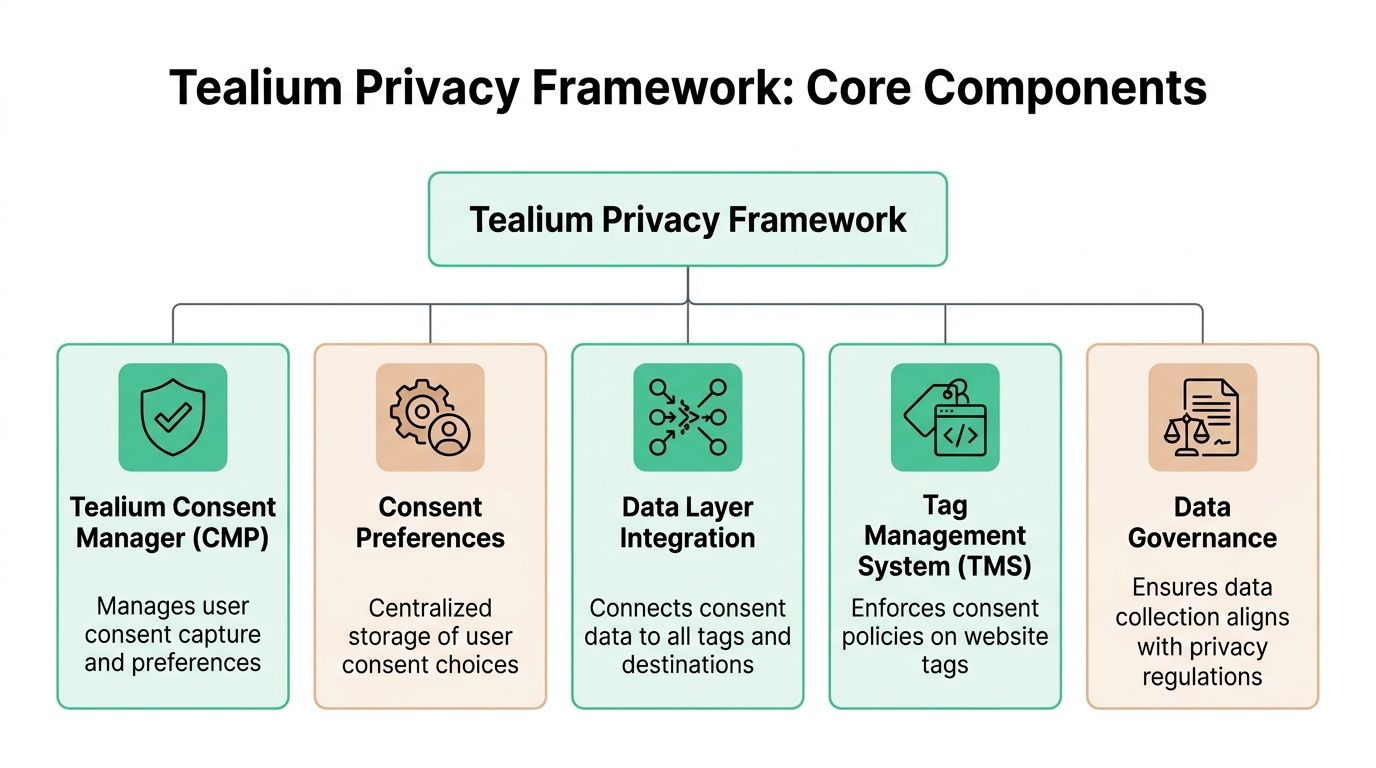
Consent capture and preference storage
At the front of the system is the consent capture layer. Depending on your setup, that may be Tealium’s older Consent Manager, the newer CookieConsent integration, a commercial CMP such as OneTrust or Usercentrics, or a custom integration.
Its job is simple in theory and demanding in practice. It must collect the user’s choice clearly, normalize that choice into usable categories, and make the current state available immediately to the rest of the stack.
The next layer is the consent preference record, a common point of failure for many weak implementations. Teams display a banner, but they don’t maintain a dependable state that tags, extensions, and event processors can read consistently. If the stored preference isn’t accessible and current, enforcement turns into guesswork.
Enforcement inside Tealium
Tealium iQ Tag Management acts as the client-side enforcement point. It decides whether a tag can fire, whether it should wait, or whether it should stay blocked.
That matters because privacy logic shouldn’t be recreated separately inside every vendor tag. Central enforcement is easier to govern and easier to audit.
The data layer is the bridge. If your consent variables, purpose mappings, and event attributes aren’t defined cleanly in the data layer, the rest of the framework can’t do its job reliably.
Governance and trust signals
A serious privacy framework also needs operational credibility. Tealium states that its platform is backed by ISO 27001, ISO 27701, AICPA SOC 2, and a HIPAA-compliant environment, and that it was recognized on G2’s 2026 Best Software Awards for Best Data Privacy Products in February 2026, as noted on Tealium’s data protection and compliance page. For teams evaluating vendor controls, it also helps to understand the SOC 2 Trust Services Criteria because those criteria shape how many enterprises review privacy, confidentiality, security, and processing integrity.
Certifications don’t configure your implementation for you. They do tell you the platform is designed to support enterprise control requirements.
The practical architecture view
When this framework is working properly, each component has a narrow, clear role:
- Consent interface: captures the user decision.
- Consent state: stores and exposes the decision.
- Data layer mapping: translates the decision into usable values.
- Tag enforcement: blocks or allows browser-side collection.
- Governance controls: keep collection aligned with policy and regulation.
That separation is what keeps privacy logic maintainable.
How Tealium Enforces Consent Across Tags and Destinations
Consent enforcement only works when the system evaluates each action against an allowed purpose. That’s why purpose-based control is more effective than simple “all tags on” or “all tags off” logic.
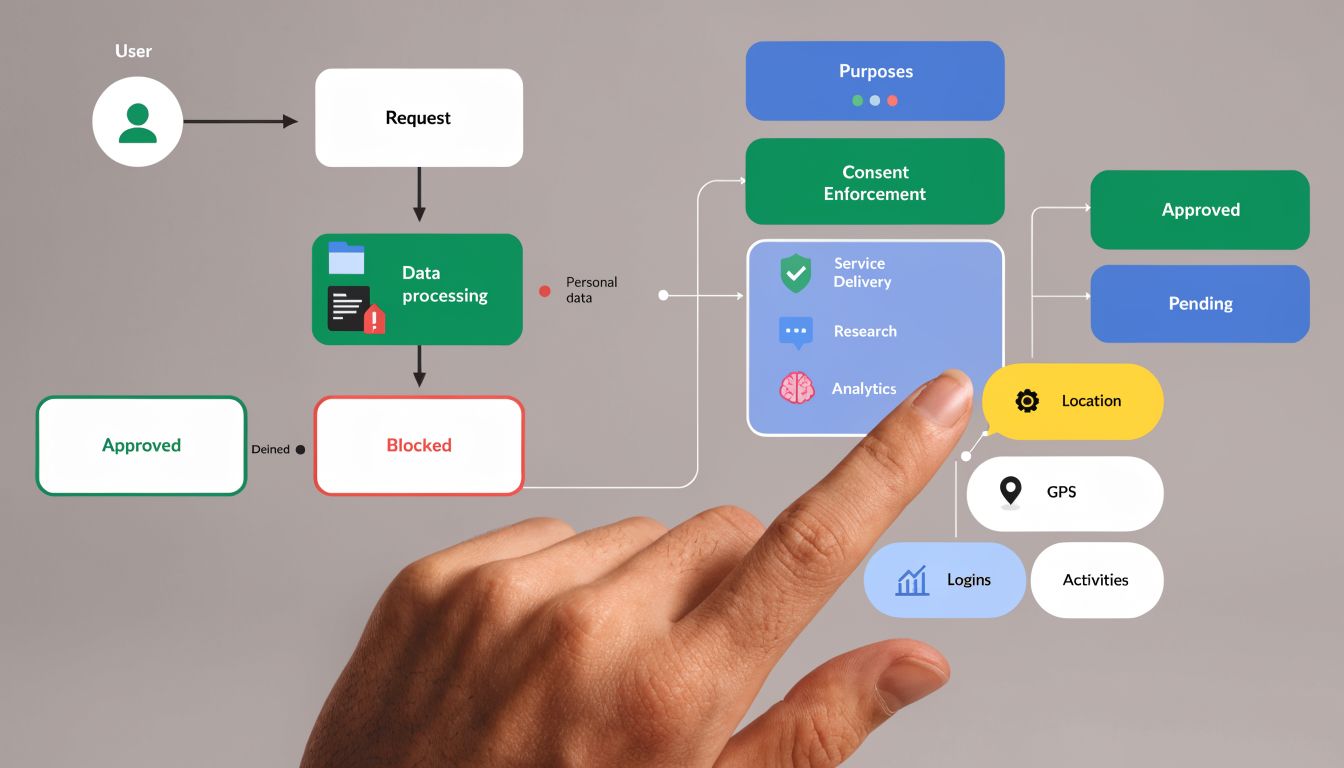
A mature setup treats consent categories like enforcement keys. If a visitor allows analytics but declines advertising, Tealium should still permit analytics collection while blocking marketing pixels, remarketing tags, and any downstream activation tied to ad purposes. That preserves legitimate measurement without ignoring the user’s choice.
Client-side enforcement logic
In the browser, Tealium uses consent state to decide what happens to tags and events. The logic is usually some version of this:
| Consent state | Tag purpose | Expected outcome |
|---|---|---|
| Granted | Matches allowed purpose | Tag can fire |
| Denied | Requires denied purpose | Tag stays blocked |
| Unknown | Requires consent before collection | Event waits or remains blocked |
| Changed by user | Previously allowed, now denied | Future firing stops and state updates |
This is where implementation discipline matters. If teams classify tags loosely, the policy becomes meaningless. I often see “analytics” used as a catch-all bucket for tools that also support advertising, audience syncs, or enrichment. That classification error creates compliance risk even when the UI looks correct.
For teams working through deployment patterns, this guide on implementing consent management in Tealium is useful because it focuses on how consent controls interact with actual tracking behavior, not just banner configuration.
Why block-by-default matters
The old failure mode in privacy setups was optimistic firing. Tags loaded first, and consent was reconciled later. That’s risky because once a request leaves the page, you can’t undo it.
A stronger approach is block-by-default with explicit release conditions. Tealium’s newer consent patterns support that operating model more cleanly than relying on load rules alone.
If a tag needs consent, it shouldn’t guess. It should wait.
A quick walkthrough helps make the mechanics concrete.
Extending consent beyond the browser
A lot of teams stop at tag firing. That’s not enough.
The harder privacy problem often sits server-side. Events collected through Tealium’s event stream need to respect purpose restrictions before they reach connectors, storage, or audience processing. If browser tags are compliant but server-side forwarding ignores the same consent state, you still have unauthorized processing.
That’s why I treat client-side and server-side enforcement as one control system. The browser is only the entry point. The destination layer is where hidden leakage usually shows up.
Implementing the Tealium Privacy Framework
A strong rollout starts with design decisions, not interface clicks. Most Tealium privacy problems come from weak definitions upstream.
Start with consent model design
Before you configure anything, define what each consent category governs. Keep categories tied to business purpose, not vendor names.
Good categories are durable. “Analytics,” “Personalization,” and “Advertising” can work if your legal basis and internal policies support them. Bad categories are vague or overloaded, such as “Marketing Tools” when those tools perform several different functions.
Use this test: can your team decide, without debate, whether each tag, event, and connector belongs in a single category or a clearly documented set of categories? If not, the model needs more work.
Build the implementation checklist
| Phase | Task | Key Consideration |
|---|---|---|
| Discovery | Inventory tags, pixels, SDKs, connectors, and storage points | Include client-side, app, and server-side flows |
| Policy mapping | Define consent categories and purposes | Align legal language with technical enforcement |
| Data layer planning | Standardize consent variables and event attributes | Avoid page-specific logic where possible |
| Client setup | Configure consent capture and Tealium iQ enforcement | Prefer centralized enforcement over custom tag logic |
| Server-side setup | Apply consent rules to event processing and destinations | Check every outbound path, not just collection |
| QA | Test grant, deny, update, and withdrawal scenarios | Validate on key templates, journeys, and regions |
| Monitoring | Establish ongoing checks after release | Watch for drift when vendors or pages change |
Configure for maintainability
Once the consent model is clear, focus on maintainability.
- Use purpose-based mappings: Don’t hardcode vendor-specific exceptions unless there’s a documented reason.
- Keep data layer names stable: Consent variables should be predictable across templates and environments.
- Separate policy from campaign logic: Privacy rules shouldn’t depend on temporary marketing conditions.
- Document exceptions clearly: If a tag is exempt, record who approved it and why.
This is also the point where mobile often gets ignored. If your web stack is tightly controlled but your app SDKs handle consent differently, the organization still has a fragmented privacy posture.
Common pitfalls during rollout
Misaligned categories
The most common issue is category mismatch between the CMP, Tealium variables, and tag conditions. A user approves one label in the banner, but Tealium is checking a different internal value.
Fix this by creating a simple consent mapping document before launch. One category name. One internal value set. One owner.
Incomplete data layer definitions
If the data layer doesn’t expose consent state early enough, tags can evaluate against null or stale values. This often shows up only on certain templates or single-page app states.
The cure is sequencing. Consent state must be available before any consent-dependent tag evaluates.
Overreliance on manual load rules
Load rules can still play a role, but they’re not a complete privacy architecture. They become fragile when many teams edit them over time.
Treat load rules as implementation detail, not as your privacy strategy.
Ignoring downstream connectors
Teams often test the browser and stop there. Then server-side events continue into ad platforms, storage endpoints, or audience workflows.
Check every destination where user data can move. If there’s no explicit enforcement point, assume you have exposure until proven otherwise.
Automated Validation for Your Tealium Setup
Privacy implementations don’t fail only at launch. They fail after the site changes.
A developer adds a new pixel directly to the codebase. A template update changes when consent initializes. A vendor tag starts sending a new parameter. A server-side route gets copied from another profile without the same restrictions. None of those issues will announce themselves.
That’s why manual spot checks aren’t enough.
What continuous validation should prove
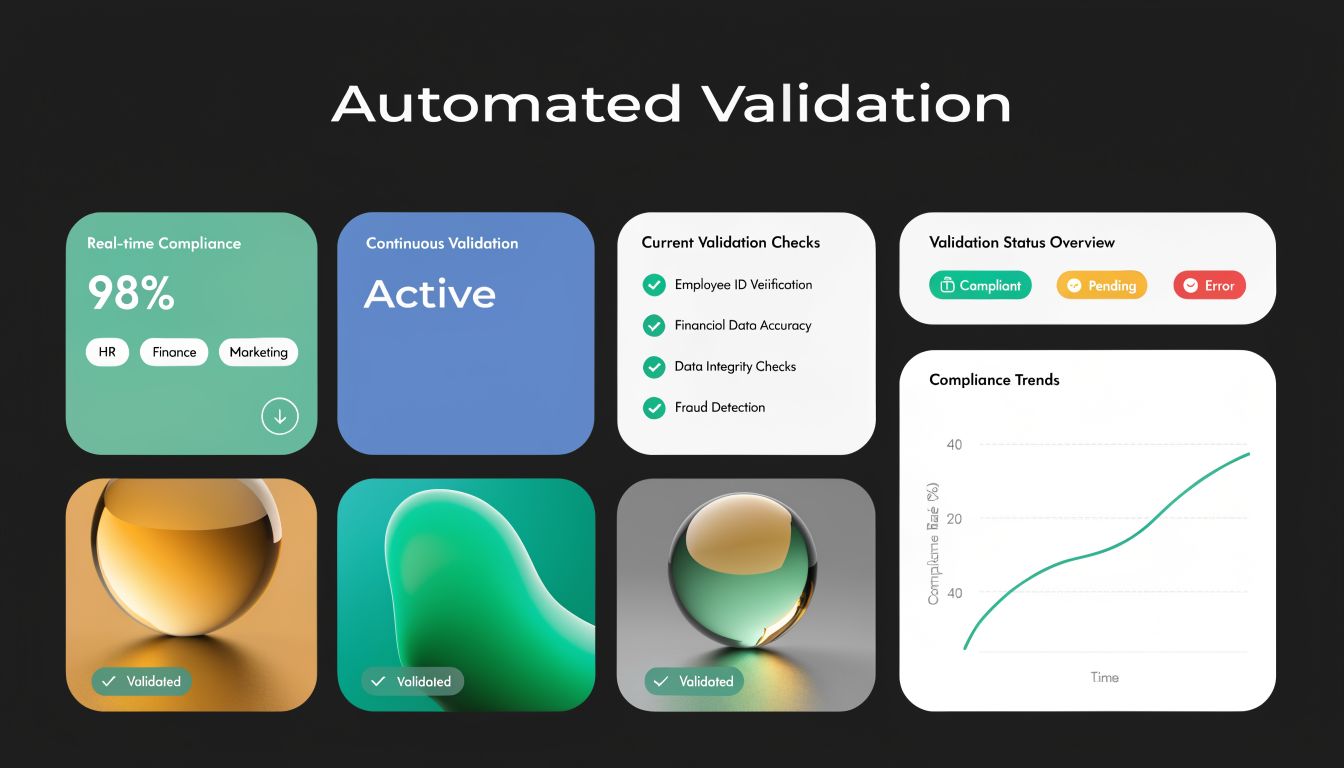
A validation layer should answer questions like these every day:
- Did any tag fire without the required consent?
- Did a blocked vendor appear on a page where it shouldn’t?
- Did event payloads change after a release?
- Did server-side destinations keep receiving events after opt-out conditions?
- Did a new implementation introduce possible PII leakage?
Those are not setup questions. They are operational control questions.
Where teams usually miss issues
A typical approach involves a combination of browser inspection, CMP test modes, and occasional QA passes. That catches obvious defects. It doesn’t catch drift well.
The biggest privacy risk in Tealium environments is silent divergence between intended behavior and actual behavior. Someone believes enforcement exists. In production, one page template, one region, or one connector behaves differently.
This is the place for automated observability. Trackingplan can sit on top of the implementation and continuously discover tags, data flows, payload changes, rogue pixels, and consent-related misfires across web, app, and server-side tracking. For privacy teams, the value is not abstract. It gives objective evidence when a tag or event behaves outside policy, and it shortens the time between breakage and detection. If you want a practical view of that process, this article on automated cookie audits for compliance and data quality is worth reviewing.
A concrete example helps. Suppose marketing consent is denied, but a retargeting pixel still fires on a checkout confirmation page after a theme release. Manual QA may miss it because the bug only appears under a specific sequence. Continuous monitoring catches the request, compares it to expected behavior, and gives the team a direct starting point for debugging. In practice, that usually leads back to a misconfigured load condition, a vendor tag outside Tealium, or a consent variable that stopped updating on a specific template.
This short video gives a useful overview of consent monitoring in practice.
What to monitor after launch
Don’t monitor everything equally. Start with the highest-risk flows:
- Advertising and remarketing pixels
- Identity and enrichment calls
- Server-side connectors to external platforms
- Pages with heavy template variation
- Regions with different consent behavior
A privacy framework is only trustworthy when you can verify it under real production conditions.
Troubleshooting Common Framework Issues
When a Tealium privacy setup breaks, the symptom usually points to only one layer. The cause often sits in another.
The banner doesn’t appear on some pages
Check page template conditions first. Then confirm the consent script or integration is loading consistently across those templates.
If the banner appears on full page loads but not on route changes, the issue is often in a single-page app lifecycle. Re-check when Tealium initializes and whether consent UI logic is bound only to initial page render.
Tags don’t fire after consent is granted
Start with the current consent state, not the tag. Confirm the granted value is written to the expected variable or register.
Then inspect the tag condition. Common causes include mismatched category values, stale cached state, and extensions running before consent updates are available.
Consent doesn’t persist across subdomains
This is usually a storage scope problem. Review how the consent choice is stored and whether the cookie or persistence mechanism is configured for the required domain scope.
Also check whether subdomains are reading the same format. I’ve seen persistence work technically while one property expects different category keys than another.
Server-side events still process after opt-out
Look at the event payload entering the server-side profile. If consent status isn’t being passed correctly, orchestration can’t apply the right rule.
If consent is present but processing continues, inspect connector and profile logic for manual exceptions. Transitional implementations often leave old rules in place, and those older paths can override the intended privacy behavior.
Tealium Privacy Framework FAQs
Should new projects still use Tealium Consent Manager
For new implementations, the older Consent Manager isn’t the direction I’d choose. Tealium’s current documentation recommends newer consent integration patterns, especially CookieConsent or CMP integrations, for stronger enforcement and better alignment with modern requirements.
Can Tealium work with a third-party CMP
Yes. Tealium supports integrations with commercial CMPs and also supports custom consent integrations when the CMP is unsupported or heavily customized. The key issue isn’t whether the CMP can display a banner. It’s whether the consent signal is normalized and enforced correctly across Tealium.
Is client-side enforcement enough
No. Browser-side control is necessary, but it doesn’t cover downstream processing by itself. If your architecture includes EventStream, EventStore, EventDB, connectors, or audience processing, server-side consent enforcement needs its own review.
Can privacy logic live only in load rules
It can, but that’s rarely durable. Load rules become hard to maintain as the stack grows, and they don’t give you the same centralized control as modern consent enforcement mechanisms.
What’s the hardest part of making the framework reliable
Classification and validation.
Many organizations can deploy a banner. Fewer teams can accurately classify every tag and destination by purpose. Even fewer can prove, week after week, that the live implementation still respects those classifications after releases and vendor changes.
If your team uses Tealium and wants a practical way to verify that consent rules, tags, and downstream destinations behave correctly over time, Trackingplan adds an automated validation layer on top of the implementation so you can detect privacy misconfigurations, rogue pixels, and tracking drift before they become larger governance issues.