Your team probably has this meeting already.
Meta reports the conversion. Google Ads reports the conversion. GA4 reports a different path. The CRM shows the deal came from branded search. Email claims it assisted. Finance looks at all of it and trusts none of it.
That's not a reporting nuisance. It's a decision problem. When every platform claims credit, budget shifts become political instead of analytical. Teams start arguing about models when the underlying issue sits lower in the stack: broken collection, inconsistent campaign tags, missing identifiers, and event pipelines nobody is actively validating.
An ad attribution accuracy tool exists to solve that lower-layer problem. Not by inventing a smarter dashboard, but by checking whether the underlying data is complete, consistent, and usable before any model tries to assign credit.
The End of Attribution Guesswork
A single purchase happens. A user saw a Meta ad on mobile, clicked a Google search ad later on desktop, returned from an email reminder, and finally converted after a direct visit. Every system involved has a partial view, and each one is happy to over-credit itself.
That's how teams end up with reports that all look plausible and still contradict each other.

The most important shift is to stop treating attribution as a model-selection exercise. It's a data trust exercise first. If the event stream is incomplete, if UTM values drift, if consent blocks one path but not another, or if server-side and browser-side records disagree, the model is just formalizing bad inputs.
That's why confidence stays low even where attribution tools are common. In a 2026 roundup, only 29% of marketers said they were extremely confident in their attribution data, while 65.7% identified data integration as their primary measurement obstacle, and 58% said they use a marketing attribution tool according to this marketing attribution accuracy roundup. Adoption isn't the problem. Trust is.
When three channels claim one conversion, the question isn't “Which model should we use?” It's “Which data should we trust enough to model at all?”
A useful mental model is this: analytics tells you what was reported. An ad attribution accuracy tool tells you whether the reporting inputs were sound in the first place.
Teams that want a broader refresher on the mechanics behind attribution can start with this marketing attribution guide for modern marketers. But in practice, the painful part isn't learning the models. It's discovering how many silent failures sit between a user action and the report your team debates on Monday morning.
Why Your Attribution Reports Are Silently Lying
Attribution numbers usually go wrong before the model ever runs. The errors start in collection, spread through transformation, and finally show up in dashboards as fake precision.
Broken tags create invisible data loss
The first failure mode is the simplest. A pixel stops firing after a release. A tag manager trigger changes. A checkout event sends on one template but not another. Nobody notices because the page still loads, the campaign still spends, and the dashboard still shows data.
It's just missing some of it.
That's why these are dangerous. Tracking failures rarely announce themselves with a total outage. More often, they create selective blindness. iOS traffic looks weaker than it is. One product category loses conversion events. Retargeting appears to decline for no obvious reason.
If you've ever seen attributed conversions drop right after a site change, there's a good chance the model wasn't the issue. Collection was.
A tool built for detecting silent tracking errors matters because silent failures are exactly what ruin attribution. If the system only tells you after revenue reporting goes off, it's too late.
Bad campaign tagging poisons the dataset
UTM inconsistencies don't look serious when viewed one by one. One person uses “paid-social.” Another uses “paidsocial.” Someone capitalizes “Meta.” An agency appends extra parameters. Email traffic lands with old naming conventions.
Now your data warehouse has five names for the same source and two different campaign taxonomies competing inside the same report.
This breaks attribution in two ways:
- Channel fragmentation: The same campaign appears under multiple buckets, so credit gets split artificially.
- Model distortion: Multi-touch paths become harder to reconstruct because touchpoints don't resolve cleanly to comparable channel definitions.
- Optimization confusion: Analysts can't tell whether performance changed or naming changed.
- Stakeholder mistrust: Once people see obvious labeling errors, they stop trusting the rest of the report too.
Browser tracking keeps losing signal
Client-side tracking used to be enough for many teams. It isn't now. Browser restrictions, ad blockers, and privacy changes cut holes in the path data, especially when the stack depends too heavily on pixels firing inside the user's browser.
That's why server-side collection has moved from “nice to have” to baseline infrastructure. According to Cometly's explanation of accurate ad attribution tools, server-side architecture captures conversion events directly from the server rather than relying only on browser pixels, which improves completeness for iOS traffic and helps recover data that pixel-only tools miss.
Practical rule: If your attribution depends mainly on browser pixels, your reports are already undercounting some journeys. The only question is how much and where.
Identity fragmentation turns one person into several users
Cross-device journeys break attribution without warning. A prospect sees a paid social ad on mobile, reads a comparison page later on a work desktop, then converts from a direct visit on a laptop at home. If your stack can't stitch those interactions, your reports don't show one journey. They show several unrelated users.
That usually makes the final known touch look stronger than it deserves. Direct, branded search, and last-click channels benefit from this by accident.
Here's what that looks like operationally:
- Acquisition gets undervalued because early touches disappear.
- Brand demand gets overstated because branded search receives credit for demand created elsewhere.
- Paid social looks volatile because some of its influence shows up downstream under other channels.
- Budget moves in the wrong direction because the reporting bias is mistaken for performance truth.
Downstream pipelines can break even when front-end tracking looks fine
Another common mistake is assuming that if a browser event fired, the data is safe. It might not be. Events can mutate in transit, arrive with schema mismatches, lose properties before reaching destinations like Segment or Amplitude, or fail to map correctly into ad platforms and analytics tools.
So yes, your attribution reports may be lying. This usually occurs not because the vendor is dishonest, but because the data collection chain has more failure points than many marketing organizations monitor.
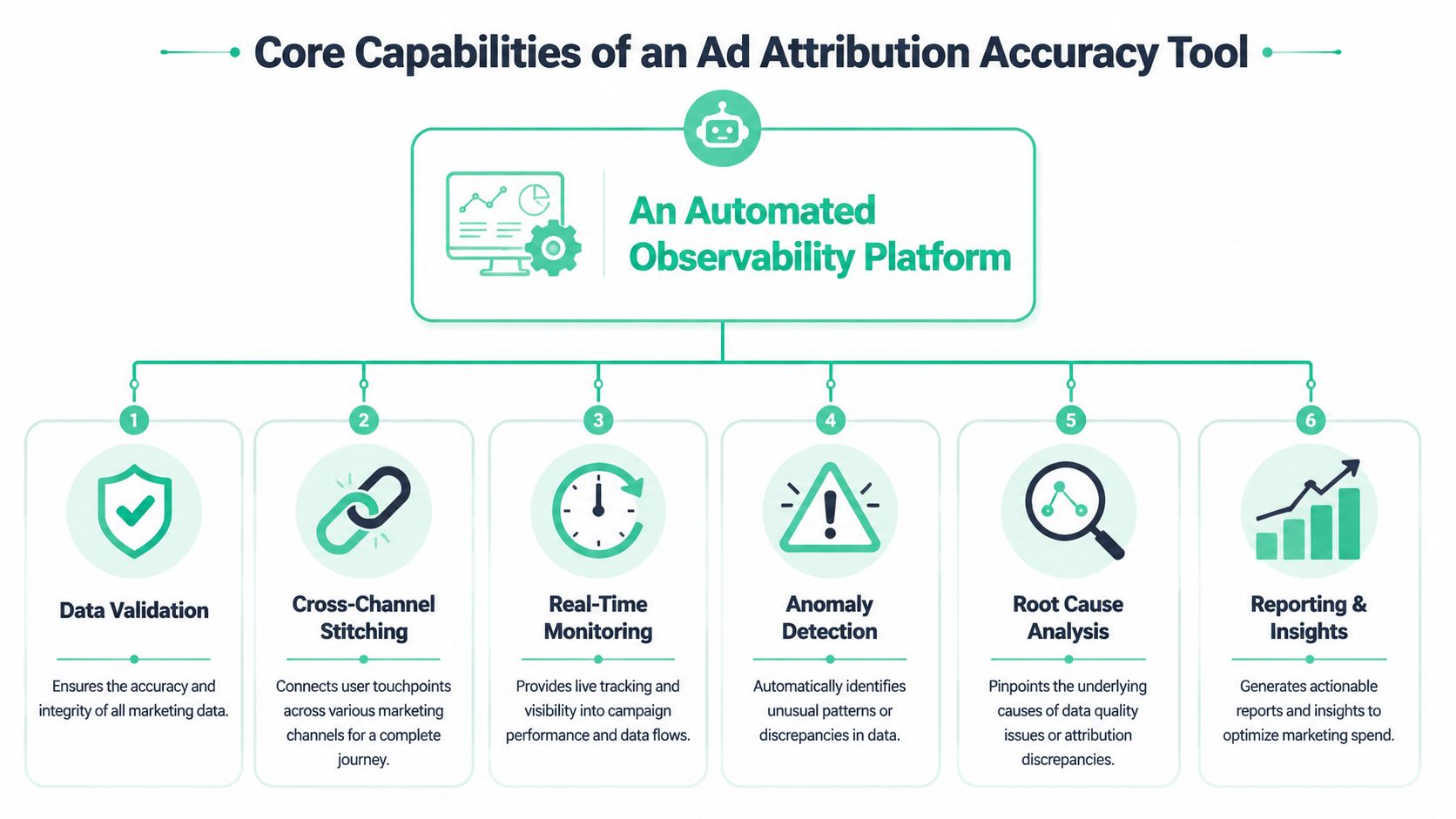
Core Capabilities of an Ad Attribution Accuracy Tool
An ad attribution accuracy tool needs to watch the data collection system the way an SRE team watches production infrastructure. The point is not to produce another attribution dashboard. The point is to catch the input failures that make every dashboard downstream less trustworthy.
Real-time tag and pixel monitoring
Bad attribution usually starts when a release ships. One trigger changes. Consent logic fires in a different order. A thank-you page stops sending a purchase event to one platform but still sends it to another. Marketing keeps spending for days before anyone notices.
A useful tool catches that quickly and shows evidence, not just a red status icon.
It should tell you:
- Where the break happened: page, template, app screen, environment, or funnel step
- What changed: missing event, renamed parameter, wrong value, blocked request, consent-state difference
- How widespread it is: one page, one browser, one geo, or the full conversion path
- Who can fix it: marketing ops, analytics engineering, web team, or agency
That level of visibility matters because attribution errors rarely fail loudly. They usually fail selectively. One channel loses signals while another keeps receiving them, and the surviving channel looks better than it is.
For teams that need this level of instrumentation visibility, this guide to an ad pixel monitoring tool is useful context.
Automated campaign and UTM validation
UTM governance fails in small ways first. A paid social launch uses Paid-Social instead of paid_social. An agency adds a new medium value that finance never approved. Internal email links overwrite campaign values and pollute acquisition reports. None of these issues look dramatic on day one. After a month, channel reporting starts to drift and no one agrees on why.
An accuracy tool should inspect campaign parameters continuously and flag problems at the source.
Good checks cover:
- Required parameters: source, medium, campaign, plus any fields your taxonomy depends on
- Formatting rules: case sensitivity, separators, approved values, and blocked variants
- Unexpected value creation: new mediums, sources, or campaign patterns outside governance rules
- Contamination: internal traffic, self-referrals, broken redirects, and malformed links
This is observability, not documentation. The tool should tell you where the bad parameter entered the system so the team can stop the issue upstream instead of cleaning reports after the fact.
Server-side and client-side reconciliation
Plenty of teams add server-side tracking and assume accuracy improves automatically. Sometimes it does. Sometimes it creates a second version of the truth.
I see the same pattern often. Browser events include campaign context but miss some conversions because of blockers or consent choices. Server events recover part of that loss but arrive late, use a different event name, or fail to carry the same identifiers. Now Meta, GA4, the warehouse, and the attribution model all count conversions differently.
A credible tool compares browser and server events for the same action and shows where they diverge. That includes duplicates, missing identifiers, schema mismatches, timestamp drift, delayed delivery, and destination-specific drop-off.
The business trade-off is simple. Server-side tracking can improve resilience, but it also adds another pipeline that can fail unnoticed. If no one is reconciling both sides, the team ends up debating model logic when the underlying problem is event mismatch.
Journey stitching diagnostics
Cross-device identity problems were covered earlier. What matters here is diagnosis.
An attribution accuracy tool should show why journeys fail to stitch and how much that failure distorts reporting. Otherwise, teams see incomplete paths and treat them as customer behavior instead of measurement loss.
Useful diagnostics include:
| Diagnostic area | What it should reveal |
|---|---|
| Identity continuity | Whether one person is split across cookies, sessions, devices, or systems |
| Touchpoint completeness | Whether key channels are missing more often than expected |
| Deduplication quality | Whether the same conversion appears multiple times across tools |
| Session handoff | Whether landing, product, and checkout steps preserve attribution context |
| Environment parity | Whether production, staging, web, and app flows behave differently |
This is one of the clearest differences between an observability platform and a modeling layer. A model will assign credit across the path it sees. An observability tool helps you determine whether that path is even complete enough to trust.
Input validation for privacy and schema integrity
Privacy controls affect attribution quality every day. If consent logic suppresses analytics events on one page but still allows ad platform calls on another, reported channel performance shifts even though user behavior did not. Analysts then chase a reporting change that was really a configuration issue.
Schema integrity causes the same kind of confusion. Event names may still look correct while the fields needed for attribution are missing. A purchase event without transaction ID, revenue, campaign context, or user identifiers can still appear in logs and still be useless for reconciliation.
The tool should validate:
- Consent-state behavior across journeys
- Potential PII leakage
- Schema consistency across destinations
- Required property presence
- Differences by browser, environment, or release version
Measurement quality checks, not just prettier reports
A tool earns the word “accuracy” only if it verifies the conditions that trustworthy attribution depends on. That means checking whether IDs persist, whether touchpoints arrive with the fields needed for attribution, whether conversions reconcile across systems, and whether those checks remain stable after releases.
In practice, this is the layer that restores trust. Teams stop arguing over which dashboard is right and start fixing the breaks that made all of them unreliable in the first place.
A Practical Checklist for Evaluating Accuracy Tools
Most vendors will tell you their platform improves attribution. That statement is too vague to be useful. You need to know whether the tool can validate the pipeline end to end and whether your team can act on what it finds.
Start by asking the vendor to show you a broken scenario, not a perfect dashboard. Ask what happens when a purchase event disappears on one checkout step, when a new UTM variant appears from an agency launch, or when browser and server events diverge for the same conversion. If they can't demonstrate diagnosis, they're selling visibility theater.
The minimum bar
These are the core questions that separate an observability tool from another reporting layer:
- Can it discover tags automatically? You shouldn't have to manually maintain a complete inventory of every pixel and analytics call.
- Can it validate rules you define? Fixed templates are less useful than custom checks tied to your naming standards and event schema.
- Can it compare environments? You need to know whether tracking changed after a release.
- Can it show evidence? Screenshots, payload diffs, request traces, and affected pages matter more than a generic alert.
- Can it monitor destinations too? Front-end collection isn't enough if the downstream pipeline breaks.
For a broader market view, this roundup of data quality tools for analytics teams is a helpful comparison point.
Ad Attribution Accuracy Tool Evaluation Checklist
| Capability | What to Ask | Meets Requirement (Yes/No) |
|---|---|---|
| Tag discovery | Does the tool automatically discover marketing and analytics tags across pages, flows, and environments? | Yes/No |
| Pixel monitoring | Will it alert when a key ad pixel stops firing, fires twice, or changes payload structure? | Yes/No |
| UTM validation | Can it enforce our source, medium, campaign, and naming conventions automatically? | Yes/No |
| Schema governance | Does it detect missing properties, renamed events, and unexpected values before they corrupt reports? | Yes/No |
| Server-side reconciliation | Can it compare browser-side collection with server-side events and highlight mismatches? | Yes/No |
| Journey diagnostics | Does it help explain identity breaks, deduplication issues, and incomplete touchpoint capture? | Yes/No |
| Consent and privacy checks | Can it flag tracking behavior that conflicts with consent rules or leaks sensitive fields? | Yes/No |
| Alert routing | Can alerts go to Slack, email, or the owner responsible for fixing the issue? | Yes/No |
| Release monitoring | Will it show what changed after a site or app deployment? | Yes/No |
| Destination observability | Does it monitor data as it lands in analytics and customer data platforms, not just in the browser? | Yes/No |
Questions that expose weak tools
Some products look polished in a demo because they show aggregate reporting, not operational evidence. Ask these questions directly:
- Show me how you detect a silent failure. Not a hard outage. A partial loss.
- Show me how you separate tagging errors from modeling differences.
- Show me how you handle both web and app data if my customer journey spans both.
- Show me how a marketer can understand the alert without needing a data engineer to decode it.
If the tool can't tell you why the number changed, it won't help you defend that number in front of finance.
The right evaluation mindset is simple. Buy the tool that reduces ambiguity at the collection layer, not the one that gives the most elegant spin on already corrupted inputs.
From Setup to Certainty A Continuous Monitoring Workflow
Monday morning, paid conversions are down 18 percent in the dashboard. Finance asks whether demand softened. Paid media suspects Meta. Product points to the new checkout. By Wednesday, three teams are debating attribution logic when the underlying problem is simpler. A release changed the purchase event payload, the server-side event kept firing, and browser-side collection dropped a required parameter.
That is the pattern an attribution accuracy tool should catch. Its job is not to produce one more model. Its job is to watch the collection layer continuously so bad inputs do not sit undetected until month-end reporting.
Start by defining what “correct” means
Installing monitoring is usually straightforward. Teams add a tag, SDK, or server-side connection in a sprint. The harder part is operational. Someone has to define the conditions that separate acceptable variance from broken tracking.
Document rules for:
- Approved campaign taxonomies
- Expected events across revenue-critical flows
- Required properties on lead, signup, and purchase events
- Consent-state behavior
- Tolerances between browser-side and server-side signals
Without those rules, monitoring produces noise. With them, it becomes an observability layer for attribution data quality.
Match the review process to the rate of change
Attribution rarely breaks because a model suddenly got worse. It breaks because the site changed, the app shipped, the consent banner was edited, a new agency launched campaigns with bad UTMs, or a destination mapping drifted.
The review cadence has to reflect that.
| Workflow step | What the team does |
|---|---|
| Daily alert triage | Marketing ops or analytics reviews anomalies and assigns ownership |
| Post-release validation | QA or analytics checks critical journeys after deployments |
| Weekly data quality stand-up | Marketing, analytics, and engineering review unresolved issues |
| Monthly attribution audit | Compare platform reporting, analytics, CRM, and finance views for drift |
Teams that do this consistently stop treating attribution as a quarterly cleanup project. They manage it like any other production system.
A useful scorecard tracks a few operational signals over time: identity match quality, touchpoint coverage, taxonomy compliance, schema stability, and the lag between incident detection and fix. As noted earlier, those indicators matter more than a polished attribution dashboard if the underlying event stream is unstable.
Troubleshoot in the order data actually fails
When conversions drop, teams often start with the channel or the model because those are the numbers they see first. That wastes time.
Start lower in the stack:
Check event continuity
Did conversion volume change in browser-side collection, server-side collection, and downstream tools at the same time?Check release history
Did a deployment change selectors, route handling, trigger logic, SDK behavior, or consent enforcement?Check campaign inputs
Did a new launch introduce malformed UTMs, missing click IDs, or unexpected source values?Check destination behavior
Did the event land in GA4, Adobe Analytics, Segment, Amplitude, or ad platforms with the expected fields and naming?Check segment-level asymmetry
Is the break isolated to iOS, app traffic, a specific browser, one country, or a landing page template?
That sequence matters because attribution errors are often selective. A tag can fail only on Safari. A consent update can suppress one destination but not another. A server-side connector can keep sending purchases while browser-side signals disappear, which makes platform-reported performance look stronger than analytics or CRM.
The fastest way to restore trust is to identify the exact break, assign the owner, and confirm that the missing signal returned after the fix.
Validate new channels before spend scales
Expansion creates a lot of attribution debt. New channels arrive fast. Validation usually does not.
Before budget ramps on TikTok, affiliates, influencer links, podcasts, or a new app campaign, confirm that the full path works:
- Campaign parameters follow the approved taxonomy
- Landing, product, signup, and conversion events fire as expected
- Identifiers pass consistently across redirects and domains
- Consent behavior matches policy
- Events arrive correctly in analytics, CDPs, and ad destinations
This belongs in launch QA. If teams wait until reporting discrepancies appear, they are already paying for bad data.
Measure confidence, not report volume
More dashboards do not fix attribution. Fewer unresolved tracking questions do.
In practice, confidence looks like this: issues are caught within hours instead of weeks, campaign naming stays clean, analytics and finance stay closer, and weekly reporting reviews spend less time arguing about whose number is right. That is how teams get from setup to certainty. They monitor the data pipeline continuously and treat attribution accuracy as an observability problem before it becomes a modeling problem.
How Trackingplan Guarantees Attribution Accuracy
A familiar failure looks like this. Paid social spend is up, platform conversions look healthy, and finance still sees a gap against recorded revenue. The attribution model gets blamed first. In many cases, the model is reading broken inputs.
Trackingplan works at the collection layer, before analysts start debating channel credit. It monitors whether analytics and marketing data are firing correctly across web, app, and server-side setups, and whether those signals stay consistent after releases, tag changes, consent updates, and campaign launches.

That is the difference between attribution software and attribution observability. One distributes credit across touchpoints. The other checks whether the touchpoints were captured correctly in the first place.
In practice, Trackingplan gives teams a running inventory of their tracking implementation and alerts them when something changes. That includes analytics events, ad platform pixels, schema definitions, campaign parameters, consent behavior, and downstream delivery into tools like GA4, Adobe Analytics, Segment, or Amplitude.
The value shows up in specific failure modes that usually slip through until reporting breaks:
- A purchase event still fires, but a required property disappears after a release
- Client-side and server-side events drift apart and start counting different conversions
- A new campaign launches with invalid UTM patterns that split reporting
- A tag manager change introduces a rogue pixel outside governance
- Consent logic suppresses collection for one region but not another
- PII appears in tracked payloads, creating compliance risk and contaminating data
Those are not modeling problems. They are data quality problems with direct budget impact.
A product walkthrough helps make that concrete:
Trackingplan fits below the attribution model and above the raw implementation work. Marketers can see when campaign metadata starts breaking. Analysts can trace why channel totals shifted. Developers can confirm whether a deployment changed event behavior. Agencies can work from the same evidence instead of sending screenshots from four platforms that all disagree.
This matters even more for teams measuring beyond click-based media. If attribution includes channels with weaker identity resolution or delayed response patterns, the collection layer has to be even cleaner. The same discipline applies in broader measurement work such as how to track TV ad results, where confidence depends on validating the input data before interpreting lift or contribution.
The business case is straightforward. Fewer bad events enter reporting systems. Problems get caught before they distort weekly performance reviews. Attribution numbers become easier to defend because the team can show what was collected, what changed, when it changed, and whether the fix worked.
Build Your Attribution on a Foundation of Trust
Teams usually ask which attribution model they should trust. In many cases, that's the wrong starting question. First-touch, last-touch, and multi-touch all fail when the underlying event stream is incomplete or inconsistent.
A reliable ad attribution accuracy tool changes the order of operations. It checks the collection layer first. It validates tags, campaign rules, identity continuity, consent behavior, and downstream delivery before anyone starts interpreting channel credit. That's how attribution becomes useful again.
This matters beyond digital campaigns too. If your measurement spans upper-funnel or offline channels, you'll also need frameworks for connecting those signals back to outcomes. A practical example is this guide on how to track TV ad results, which shows how measurement discipline has to extend beyond click-based media.
Trust in attribution doesn't come from a prettier dashboard. It comes from a system that can prove the data entering the dashboard is fit for analysis. Once that foundation is in place, model debates become productive instead of endless.
If your team is tired of arguing with conflicting attribution reports, Trackingplan gives you a way to monitor the data layer continuously, catch tracking problems early, and build reporting on inputs you can defend.